Responding to coronavirus (COVID-19) together

During these are unprecedented times we wanted to let you know what we are doing to respond to the outbreak.

To protect the health and wellbeing of our employees and their families, all EDSL staff are working remotely. However our support and consultancy services remain fully operational and contactable via email and phone.

As countries all over the world put restrictions in place and encourage people to use social distancing, many of our customers will also be working remotely. We have implemented the following policies to help you during these difficult times.


Remote Working and License Access

During these times of social distancing and remote working users may need additional flexibility. Should you need an alternative method for sharing a license or if you no longer have the same access to your license, please contact support@edsl.net and we will be able to provide you with free temporary licenses.


New Roaming Network Licenses

We also have new roaming network licenses in Tas 9.5 which are ideal for remote working and sharing licenses between different locations.


Training and Education

After a long break our in person training will resume in February, however we continue to make our e-training courses freely available for the time being.  Please note that you will need to sign up to enrol on a course.


Support

Our support staff are here to help as normal. Please get in touch via email for the quickest response at support@edsl.net. Also visit our support page and FAQ sections for alternative assistance.


Student Access

As always, access to Tas is free for Acadmic and Research purposes. Get in touch with support for an academic license.


New Users/Trials

For new trial requests and additional licenses please visit Buy Online for options or contact support@edsl.net.
Carrying Out a Domestic Overheating (TM59) Assessment Using Tas.

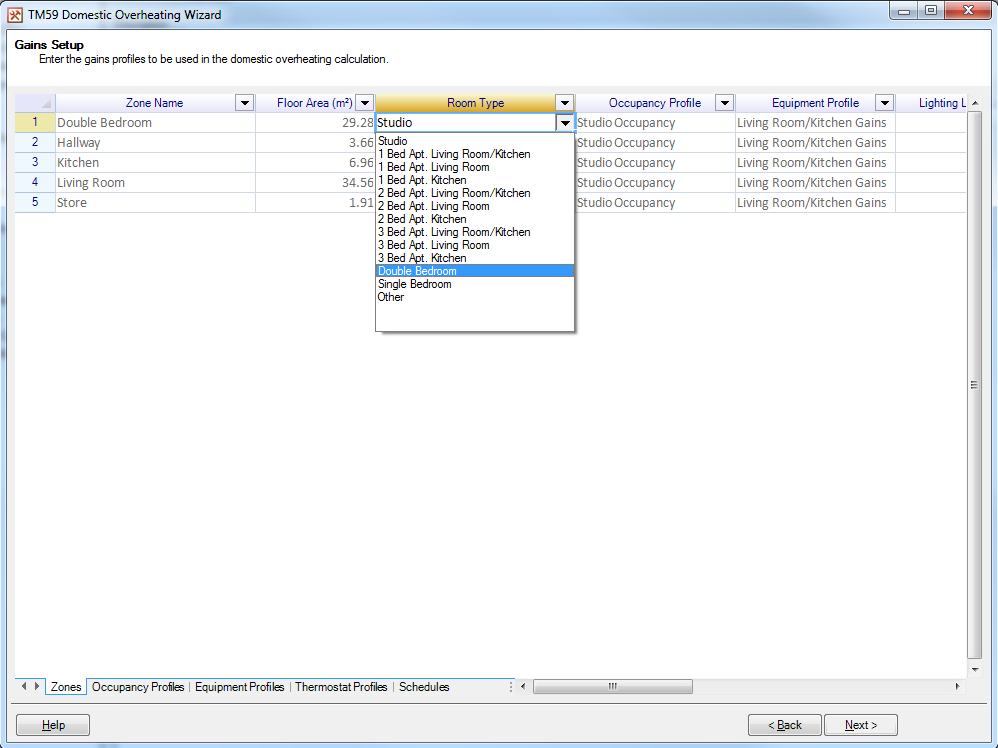
In 2017, CIBSE released a new technical memorandum, TM59, which provides a method of assessing overheating in homes. While other overheating criteria exist, i.e. TM52 for non-domestic buildings, TM59 differs from the rest by requiring more work from the assessor to complete the assessment. To help speed up the process of carrying out a TM59 assessment, Tas has introduced a TM59 wizard in V9.4.2. The first feature of the TM59 wizard is the ability to create the internal conditions for a TM59 assessment. The TM59 guide dictates the internal gains to be used during the assessment for most room types. Due to this, the wizard allows you to assign the gains to the spaces by setting the room type.

A Screenshot of the Gains Setup page, showing the Room Type being set for a double bedroom.

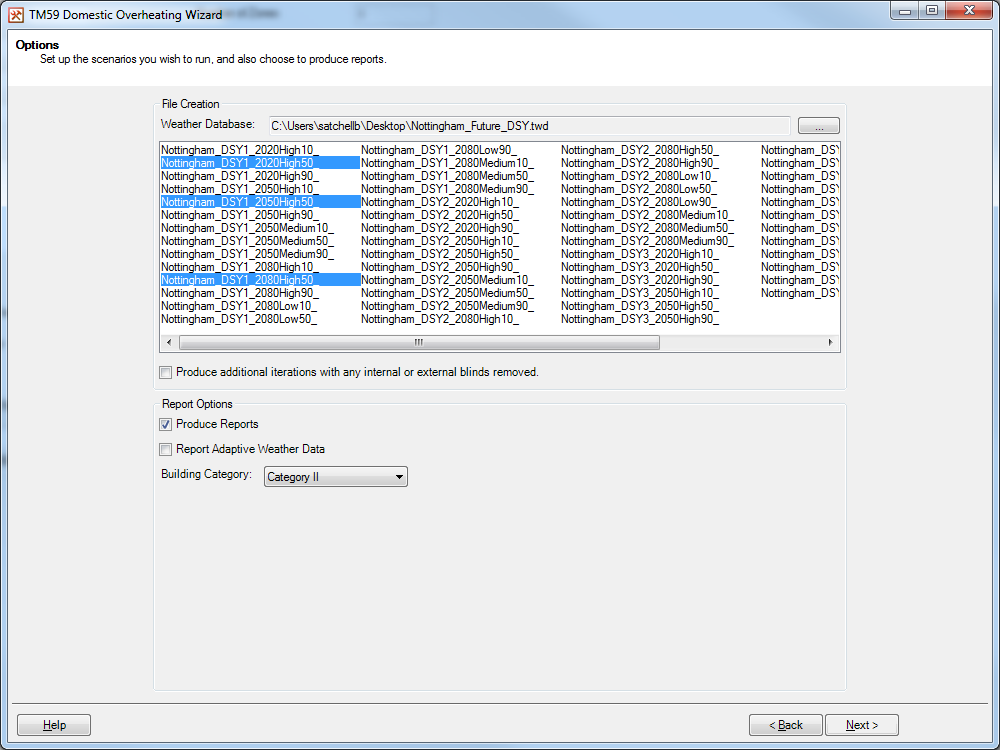
For most assessments, the gains specified in the TM59 guide must be used, but there are cases when some freedom is allowed and the wizard supports this via custom values. The second feature of the TM59 Wizard is the ability to make multiple scenarios and run them simultaneously. This is useful as while the minimum that needs to be done to pass a TM59 assessment is to pass all criteria while using a CIBSE DSY1 2020, high emissions, 50% percentile scenario weather file; TM59 strongly recommends the assessments to be run with multiple different future weather files, however these assessments do not need to pass. To help aid the creation and simulation of multiple different scenarios, the wizard allows the creation of multiple scenarios using different weather data, or with any blinds included in the model removed. Not only are these scenarios created by the wizard, they will also be simulated automatically by the wizard after creation.

A screenshot of the Options page, where multiple weather files selected.

The final feature of the TM59 Wizard is the ability to produce reports for each simulated scenario, detailing if they pass or fail. For TM59, the compliance criteria differs if the home is predominantly naturally ventilated or mechanically ventilated. If the home is naturally ventilated, it will need to pass both of the following criteria:
  • For Living Rooms, Kitchens and Bedrooms – These spaces must meet Criterion 1 of TM52, i.e. the number of hours where ΔT is greater than or equal to 1K during the summer period cannot be more than 3% of the summer occupied hours.
  • For Bedrooms only – The operative temperature cannot exceed 26 °C between the hours of 10pm and 7am for no more than 32 hours.
While if the home is mechanically ventilated, the home will need to pass the following criteria:
  • Occupied rooms should not exceed an operative temperature of 26 °C for no more than 3% of the annual occupied hours.
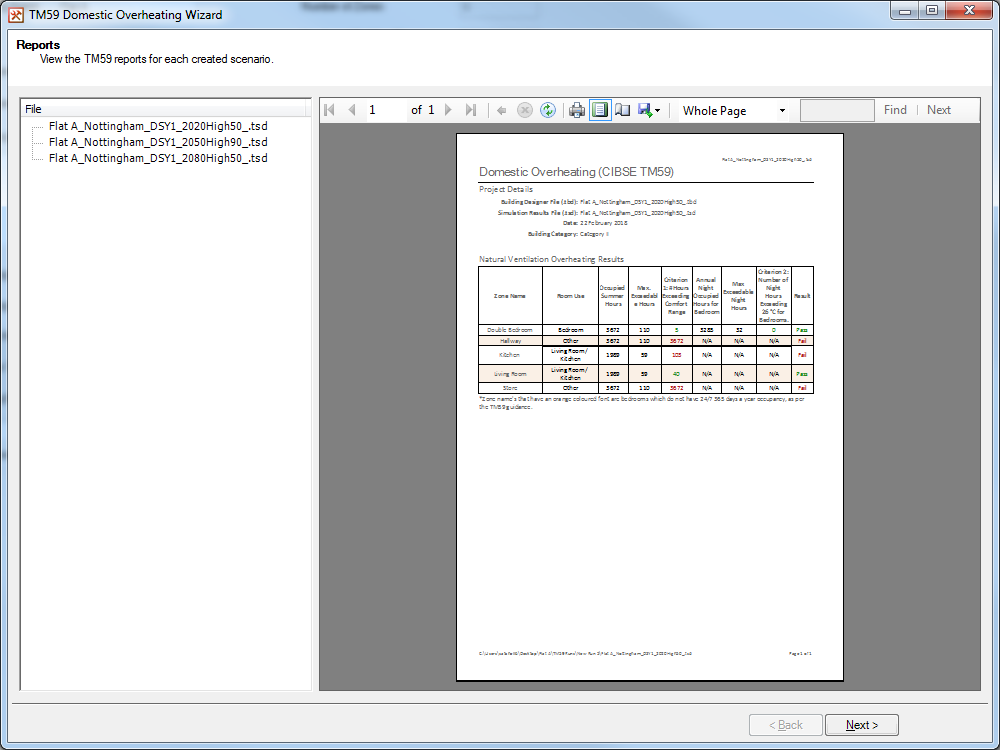
For each simulated scenario, a report will be generated detailing if the spaces in the model have passed or failed. These reports can be exported to PDF, Excel or Word at a click of a button.

A screenshot of the Reports page, showing the report produced by the wizard.

If you are interested, more information about TM59 including how to purchase the guide can be found here.

Update (June 2022)

The TM59 wizard has been updated in Tas to assist with demonstrating complaince with Approved Document O. There is a new aperture function available in the software which allows you to easily setup windows that stay open all night if the internal temperature exceeds 23°C at 11pm.

For more details, please see the TM59 documentation.