What is a TM54 assessment and should you carry one out on your building?
I’m sure you will have heard about the performance gap between design stage estimations of energy consumption and real life energy consumption upon building completion, there can be a number of reasons for this such as the on-site management of the HVAC systems, occupants behaving unexpectedly, changes in the later stage of building design that weren’t accounted for or a poorly implemented “soft landings” strategy. Another key reason for the performance gap could be that there wasn’t actually an assessment carried out to estimate energy usage of the building design!
In the UK an L2 assessment must be carried out on any new commercial building to ensure it’s design is efficient enough – this assessment is a comparison against a similar “notional building” that has the same geometry and location but uses standard efficiency values and constructions. Building occupancy levels, internal gains and running periods are assumed depending on the building category and cannot be adjusted by the assessor to reflect the actual values for the building. The L2 assessment isn’t intended to predict the energy usage of a building and even omits significant areas of usage such as small power, lifts and external lighting. Unfortunately the values produced by this assessment are sometimes incorrectly used as indicators of a buildings expected energy usage leading to a significant performance gap between design and reality as shown in the graph below.
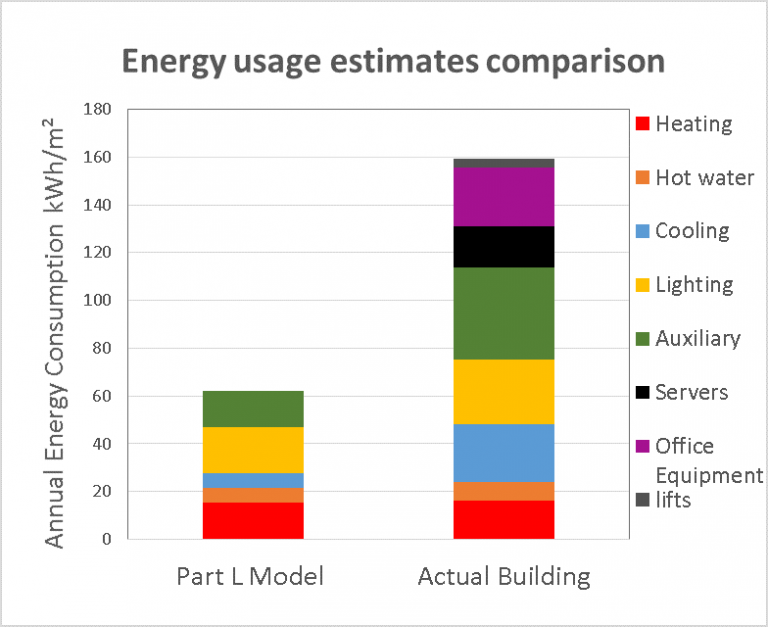
This is where technical memorandum 54 comes in, it was published by CIBSE in 2013 with the aim of providing building designers and engineers with an approach to estimate the operational energy demand of a building using a DSM (Dynamic simulation model) tool; this can even be carried out at the design stage. It outlines methods on how to estimate the energy consumption of a building for each energy category (heating, cooling, auxiliary etc.) and contains guidance on including for margins of uncertainty on the estimations.
To carry out a TM54 assessment the building must be modeled in much greater detail then it would be for an L2 and EPC assessment a few examples of how are:
· The actual building occupancy for the building should be modeled and this should account for people coming in early or staying later in the evenings – what if the building has more or less occupants than the design included for? This should be accounted for within the uncertainty margin calculations.
· Electrical equipment included in the building should be assessed in detail, things like how many PCs per room, what power consumption each PC and monitor will have and will there be any additional equipment such as desk lighting should be considered.
· External lighting, Lifts and small power are to be included in the results.
· The HVAC should be modeled as closely as possible to how it will run in reality.
· The assessment should include iterations of the model to show high and low end estimates for each energy usage category.
The graph below shows an example comparison of energy consumption estimations for part L, TM54 and the actual building (which can be obtained using metering over an occupied year) , it’s clear to see that the L2 assessment is not to be used for an actual buildings energy consumption approximation.
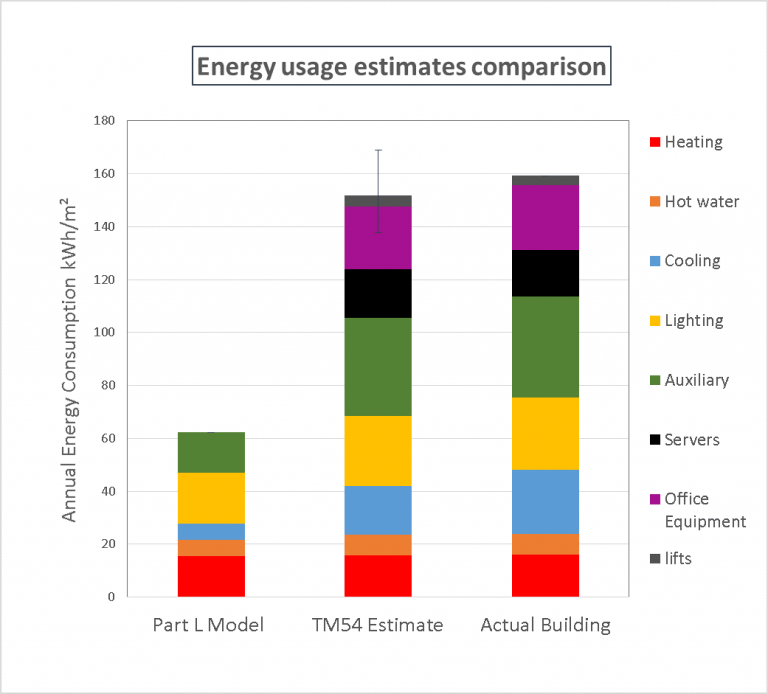
If carried out correctly TM54 can be used to aid in creating a building design that will meet energy usage targets and can be used to test the effects a change in the design would have on the resulting energy usage breakdown. This should enable the design to be adjusted to maximize efficiency within the budget for the building. It may also be possible to achieve additional BREEAM credits for a building if a TM54 is carried out and the post occupancy assessment shows that the building is performing as the design predicted.
If the building is already nearing completion and there is little scope to change the design TM54 can still give insight into the breakdown of energy consumption for the building, give potential occupiers a more accurate indication of energy use and identify areas of the building that are not performing to design expectations, perhaps due to HVAC controls that need altering.
Working in the industry of building design we have a responsibility to work towards reducing the performance gap where possible, striving towards more efficient buildings, reduced greenhouse gas emissions and a more sustainable future for ourselves and younger generations.
If you would like to read more TM54 can be purchased from CIBSE here: https://www.cibse.org/Knowledge/knowledge-items/detail?id=a0q20000008I7f7AAC
If you would like a TM54 carrying out on a building this is something that our consultancy team may well be able to help you with or if you’re interested in learning how to carry one out yourself you can get a free trial of Tas and start learning how to use the software!